Professional 4-Week Excel Roster Template – Rotating Shift Planner for Staff Management
Professional 4-Week Excel Roster Template – Rotating Shift Planner for Staff Management
Couldn't load pickup availability
Plan Shifts Like a Pro with Our 4-Week Excel Roster Template
Manage rotating shifts effortlessly with this professional Excel template, designed for healthcare, retail, hospitality, and other shift-based industries. Automate calculations, customize shift codes, and track FTEs—all in one easy-to-use tool.
✨ See It in Action! 📽️ Watch the video on YouTube: https://youtu.be/mfZtuQ_NNJA
Looking for a Monthly View?
This template is designed for an exact 4-week view, starting any day you choose.
If you need a monthly schedule that automatically adjusts for 28, 30, or 31 days, check out our Monthly Employee Schedule Template. Monthly Employee Schedule Template
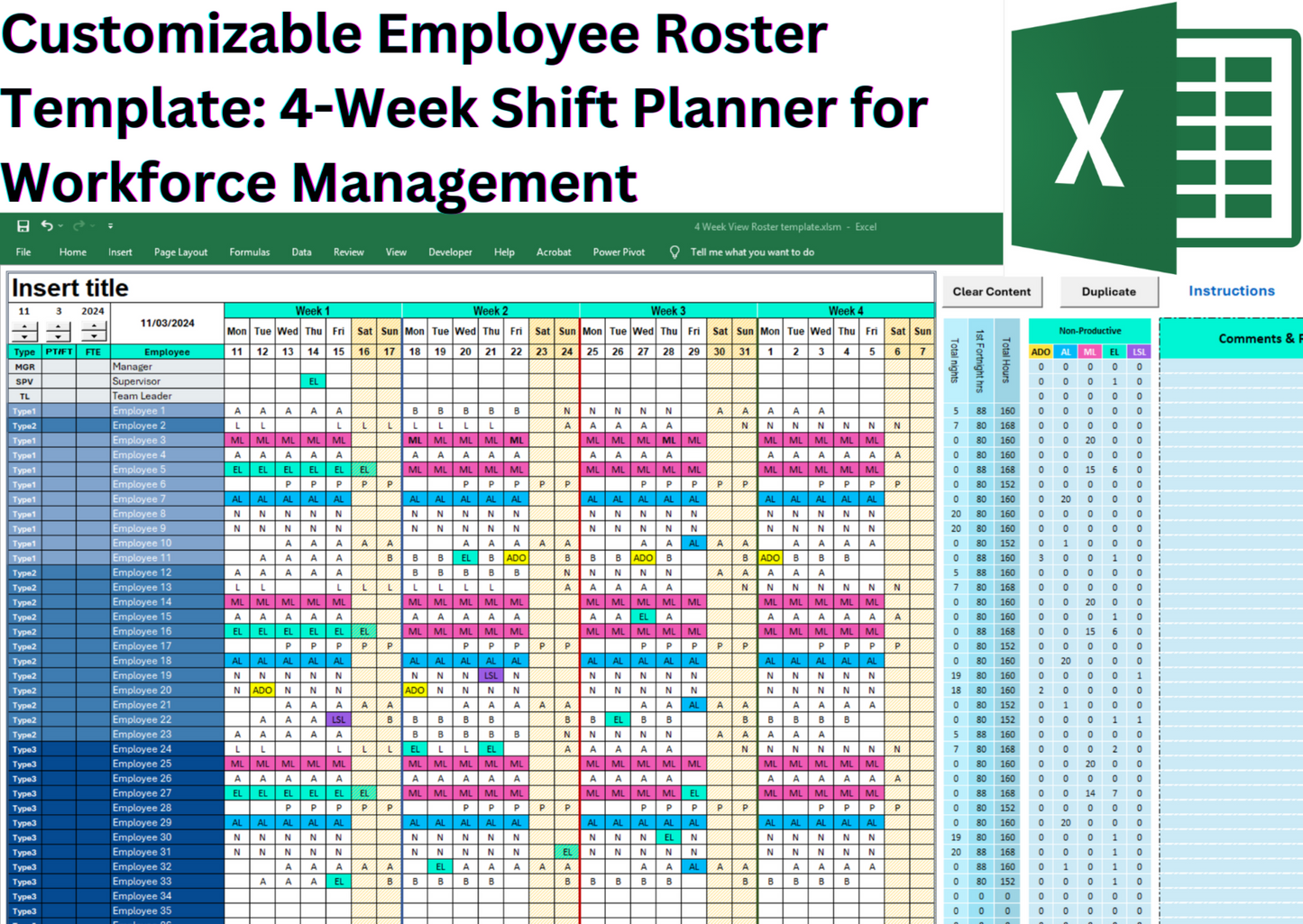
📆 Fixed 4-Week Employee Roster Template with Adjustable Start Date: This Excel-based staff scheduling template is designed with a fixed 4-week layout, ideal for short-term workforce planning. Simply select your preferred start day, month, and year, and the calendar will populate the 4-week period accordingly. Whether you're planning by pay cycle, rotation block, or operational period, this tool ensures consistent scheduling without needing to adjust the calendar structure.
🔤 Customizable Shift Codes (with Auto Hour Calculation)
Plan and manage rotating shifts such as Morning (A), Afternoon (P), and Night (N).
Examples:
• A = Morning Shift (8 hrs)
• N = Night Shift (10 hrs)
All codes are fully customizable (e.g., D for Day, E for Evening).
✔ When you assign shifts, the template automatically calculates total working hours per employee for payroll accuracy.
👥 Employee Team Allocation (with FTE & Headcount Tracking)
Assign employees to up to 4 different teams or grades for better workforce organization.
Examples: OPS = Operations, HR = Human Resources, MGT = Management, SALES = Sales
✔ Automatically calculate Full-Time Equivalents (FTE) for each team.
✔ Track headcount per team and per shift in real time.
🎨 Color-Coded Non-Productive Shifts (Customizable)
Manage leave types with customizable codes and colors: AL = Annual Leave, ML = Maternity Leave, LSL = Long Service Leave.
✔ Template automatically calculates non-productive hours and updates payroll totals.
🏖️ Weekend & Public Holiday Highlighting
Automatically highlights weekends and public holidays for better planning.
💰 Salary Calculation with Penalty Rates
Set hourly rates for each employee, plus Saturday, Sunday, and public holiday penalty rates.
✔ Salary is automatically calculated based on total hours worked and penalty conditions—saving you hours of manual payroll work.
⏱️ Shift Count & Skill Mix Tracking
Monitor AM, PM, and Night shifts and track headcounts per shift to maintain skill balance.
📊 Staff Summary Dashboard & Payroll Automation
✔ Total night shifts per employee
✔ Total hours worked
✔ Leave type breakdown
✔ Automatic salary calculation with penalty rates
🔄 Macro Features
Includes Duplicate and Clear buttons for faster editing.
✔ One-click reset for a fresh schedule.
✅ Supports Up to 40 Employees
🌟 What You’ll Get:
📂 Excel File (Macro-Enabled Version): Includes Duplicate & Clear Content buttons for faster editing
✅ 4-Week View – Ideal for short-term workforce planning
✅ Print-Ready Format – Easily share and distribute schedules
✅ Built-in Shift Automation & FTE Calculation – Streamline shift assignments and track full-time equivalents
✅ Customizable Layouts & Shift Codes – Tailor the template to fit your needs
✅ User-Friendly Interface – Easily navigate and customize your schedule
✅ Real-Time Schedule Visibility – Instantly track employee availability
Take your shift management to the next level with our dynamic Excel rostering template. Try it out today and experience the benefits of streamlined shift planning and scheduling.
Share