52-Week Excel Roster Template – Annual Shift Planner
52-Week Excel Roster Template – Annual Shift Planner
Couldn't load pickup availability
52-Week Excel Roster Template for Annual Shift Planning
Plan an entire year of staff shifts in one Excel workbook. Choose any start date, track FTE and headcount, calculate hours and wages, and navigate quickly to today’s roster.
🎥 Quick Demo: How to Use
👉 Video Showcase: Watch Our Template in Action!
Looking for an Exact 4-Week View?
If you need a 4-week schedule that can start any day, check out our 4-Week Employee Schedule Template. Professional 4-Week Excel Roster Template – Rotating Shift Planner for Staff Management
Designed by professionals, for professionals, this comprehensive Excel roster template transforms complex scheduling into a streamlined, intuitive process.
🌟 Key Features:
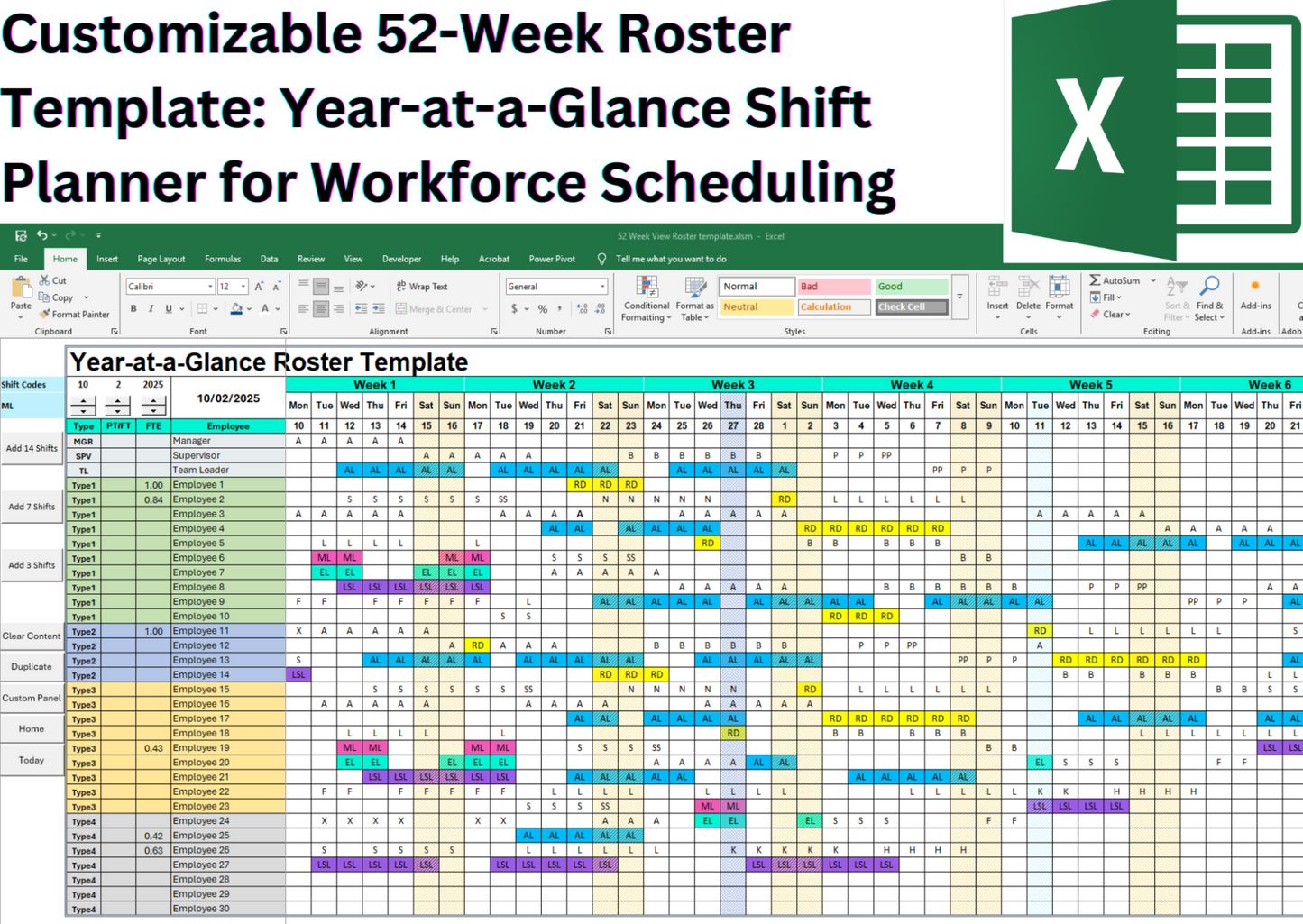
📅 52-Week Year-at-a-Glance View
Visualize and manage shifts across the entire year for better workforce planning.
📆 Flexible Start Date
Choose any start day, month, and year—ideal for fiscal calendars or mid-year planning. The calendar auto-populates all 52 weeks, eliminating manual date entry.
📍 Auto-Highlight Today’s Date – Instantly find today’s date anywhere in the 52-week roster with automatic highlighting. Plus, a built-in navigation button takes you straight to today’s schedule for quick access.
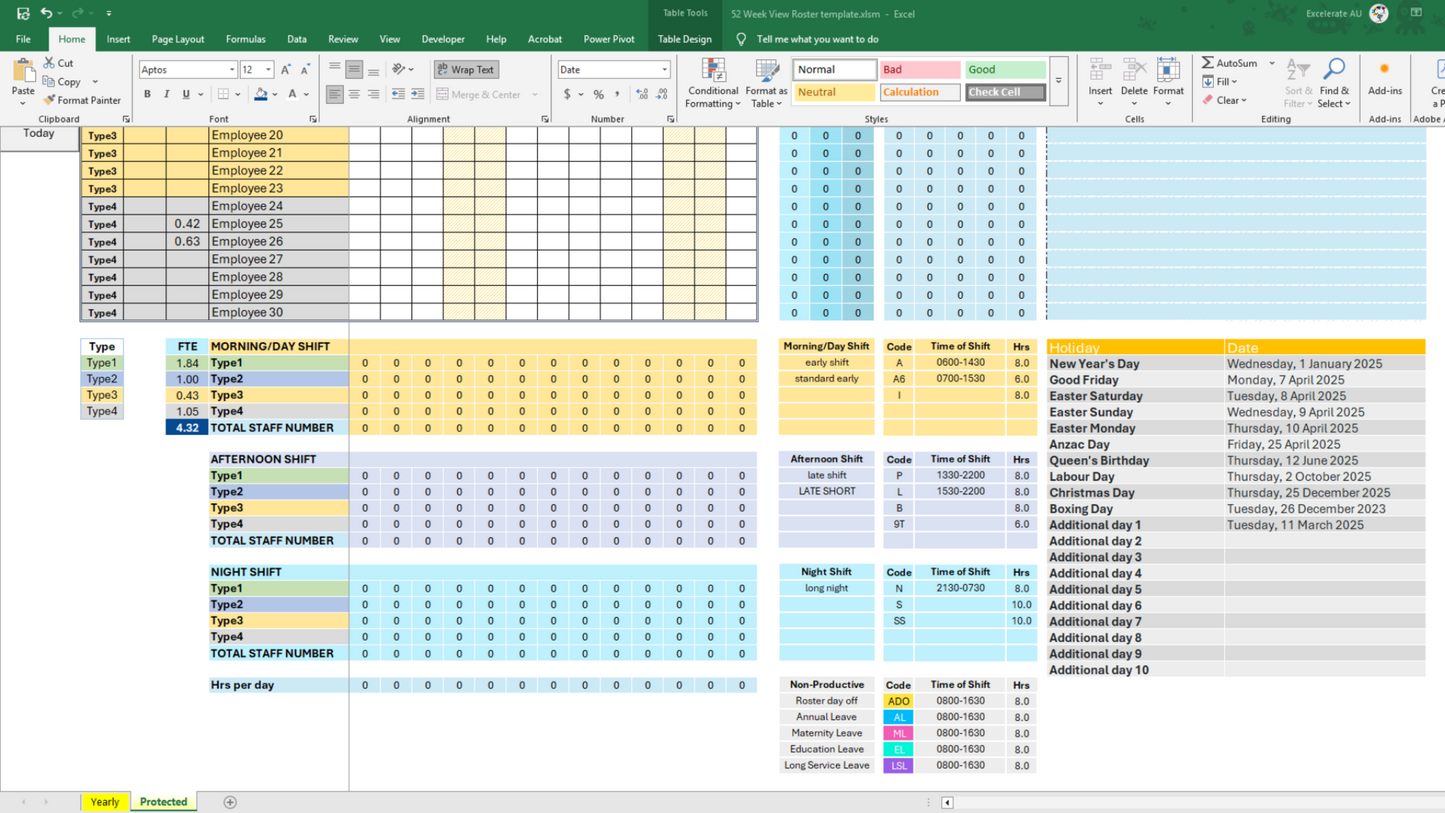
🔤 Customizable Shift Codes (with Auto Hour Calculation)
Plan rotating shifts such as Morning (A), Afternoon (P), and Night (N).
Examples:
• A = Morning Shift (8 hrs)
• N = Night Shift (10 hrs)
✔ Fully editable codes (e.g., D for Day, E for Evening).
✔ Auto-calculates total working hours per employee for payroll accuracy.
🏖️ Weekend & Holiday Highlighting – Automatically mark non-working days for better resource planning.
🎨 Macro Navigation Buttons – Built-in navigation buttons let you quickly move between key sections, including:
✔️ Home Page
✔️ Shift Customization Panel
✔️ Public Holiday Panel
✔️ Today’s Date Button for instant access to today’s schedule
🖱️ "Add Shift" Macro Button – Quickly allocate the same shift for the next 3, 7, or 14 days with just one click, reducing manual data entry and preventing scheduling errors.
💰 Salary Calculation with Penalty Rates
Set hourly rates for each employee, plus Saturday, Sunday, and public holiday penalty rates.
✔ Salary auto-calculated based on total hours worked and penalty conditions—effortless payroll accuracy.
🔤 Customizable Shift Codes (with Auto Hour Calculation)
Plan and manage rotating shifts such as Morning (A), Afternoon (P), and Night (N).
Examples:
• A = Morning Shift (8 hrs)
• N = Night Shift (10 hrs)
All codes are fully customizable (e.g., D for Day, E for Evening).
✔ When you assign shifts, the template automatically calculates total working hours per employee for payroll accuracy.
👥 Employee Team Allocation (with FTE & Headcount Tracking)
Assign employees to up to 4 different teams or grades for better workforce organization.
Examples:
• OPS = Operations
• HR = Human Resources
• MGT = Management
• SALES = Sales
✔ Automatically calculate Full-Time Equivalents (FTE) for each team.
✔ Track headcount per team and per shift in real time.
🎨 Color-Coded Non-Productive Shifts (Customizable)
Easily manage leave types with customizable codes and colors.
Examples:
• AL = Annual Leave (8 hrs)
• ML = Maternity Leave (8 hrs)
• LSL = Long Service Leave (8 hrs)
✔ Assign durations for each leave type (e.g., AL = 8 hrs).
✔ Template automatically:
o Calculates total non-productive hours per employee
o Counts leave shifts per employee
o Updates total working hours for payroll
🏖️ Weekend & Public Holiday Highlighting
Automatically highlights weekends and public holidays for better planning.
⏱️ Shift Count & Skill Mix Tracking
Monitor AM, PM, and Night shifts and track headcounts per shift to maintain skill balance.
📊 Staff Summary Dashboard & Payroll Automation
✔ Total night shifts per employee
✔ Total hours worked
✔ Leave type breakdown (AL, SL, etc.)
✔ Automatic salary calculation with penalty rates for weekends and public holidays
This Excel 52-Week Roster Template is the ultimate solution for long-term shift planning and workforce optimization. Whether managing healthcare teams, retail staff, or hospitality schedules, this tool empowers you to track shifts, automate calculations, and make data-driven decisions—all in one place.
🌟 What You’ll Get:
📂 Excel File (Macro-Enabled) with:
✅ 52-Week Year-at-a-Glance View
✅ Auto-Highlight Today’s Date & Instant Navigation
✅ Built-in Shift Automation & FTE Calculation
✅ Customizable Layouts, Shift Codes & Macro Buttons
Perfect For
- HR Managers
- Workforce Planners
- Healthcare, Retail, and Hospitality Teams
Related templates
Share